Joomla Review - An In-Depth Look at the Popular CMS

Joomla is one of the web's most popular open-source CMS and one of the most used open-source CMS worldwide. Does Joomla, however, hold up to its popularity? Read on to find out what I think in this Joomla Review. It's been quite some time since I did an updated Joomla review so I figured now, with the release of 2.5.6, it would be a good opportunity to update the reviews section with something a bit more current.
Grab a cup of coffee and sit back. It's time to dig into my Joomla Review.
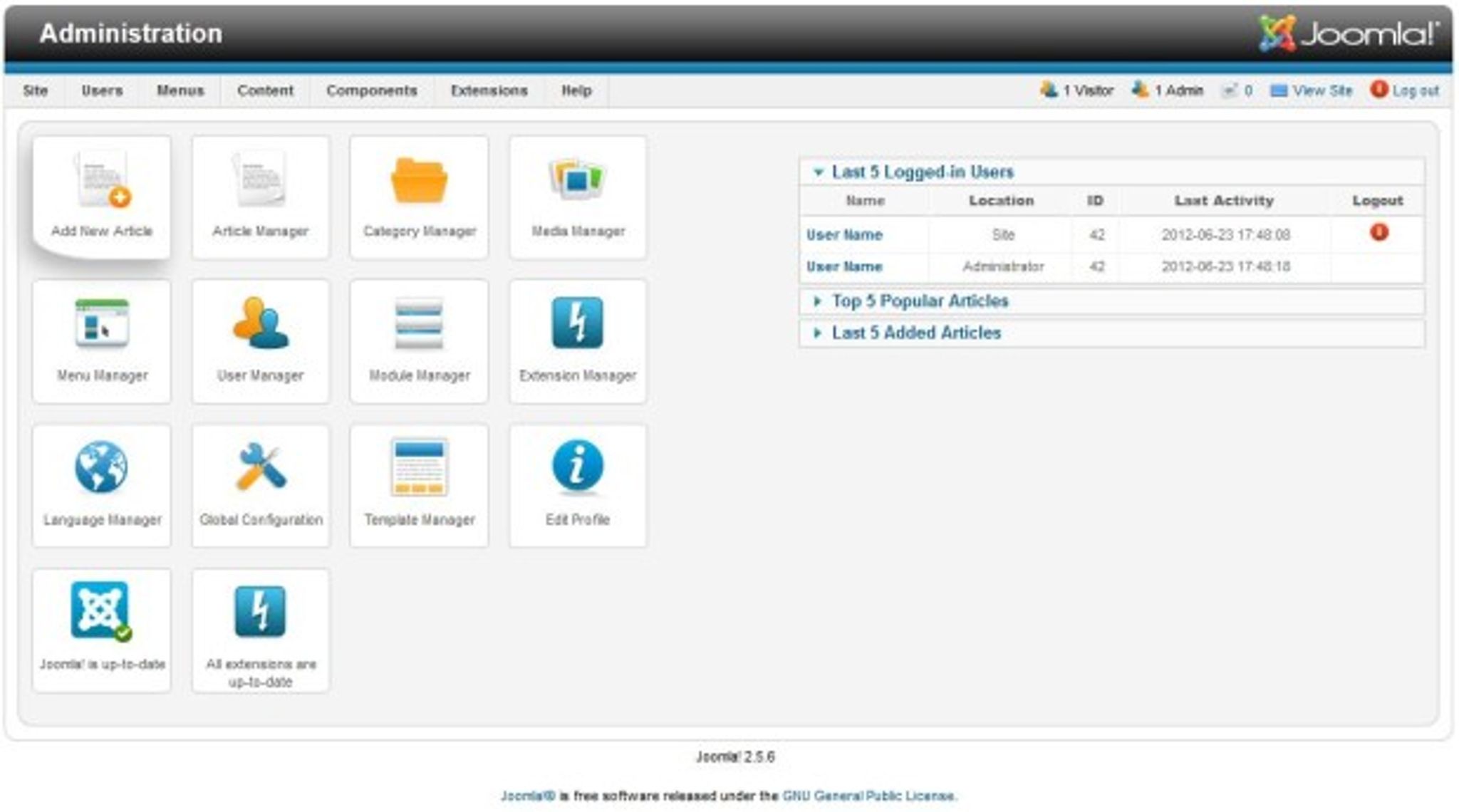
Once you have the system installed, you'll be able to connect with the Joomla administrative interface. Upon first login, you'll be greeted with the following dashboard screen with which you will manage your installation.
Joomla Review – Administration:
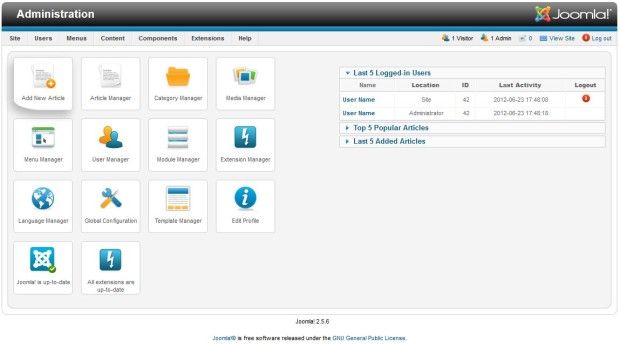
From within the dashboard, you'll notice that Joomla offers an array of context menus along the top with quick access to the many administrative screens within the CMS. There are also a number of buttons and configuration screens which will change depending on the menu you've entered.
For example, under the site menu you can configure the basic settings for the Joomla site (there is also the ability to put the site in maintenance mode from here).
Joomla Review – Site Settings:
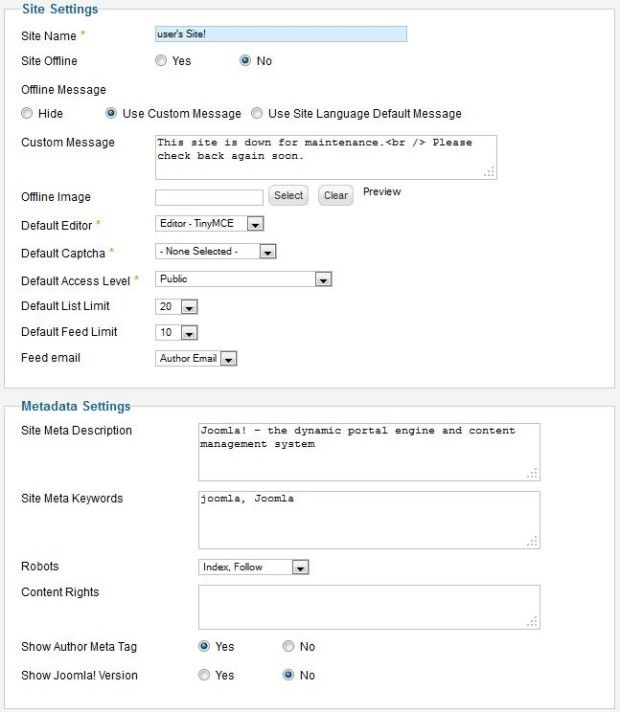
The ability to put your Joomla site offline from here is actually new to the 2.5 series and you are given a number of ways to customize how your offline message is handled. As you can see, you can customize the message with your own text & images or use the system default. Selecting the hide option when the site is in offline mode will simply show a login screen, forcing users to authenticate with the system.
By default, Joomla 2.5 ships with three options as far as editing content is concerned. They are TinyMCE (the default), CodeMirror (a code editor for which will highlight mismatched tags and allows you to write in HTML) and none (which turns off the WYSIWYG option entirely).
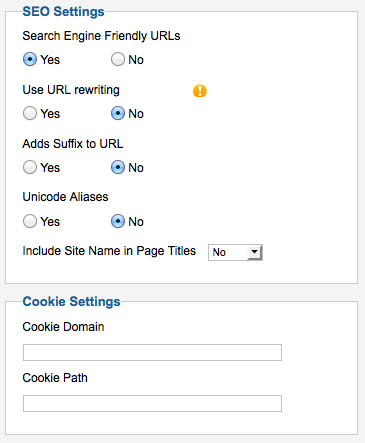
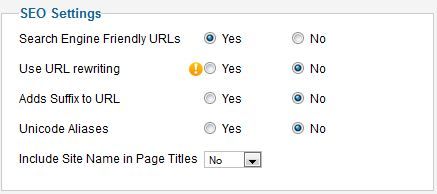
On the other side of this screen is Joomlas SEO Settings panel which, while brief, gives you basic SEO functions for the site.
Joomla Review – SEO Settings:
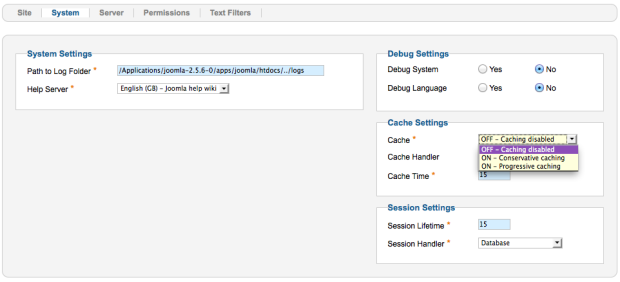
On the Systems tab, we find the settings for enabling debugging within Joomla as well as Joomla's caching capabilities. You can also set the path to your log folders and help server (if you have customized any of the help functionality, this may be useful).
Joomla Review – The Systems Tab:
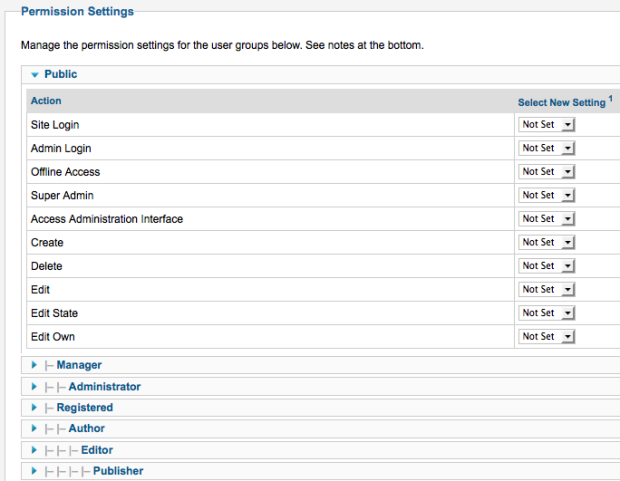
Site wide permissions can be configured within Joomla on the Permissions tab. Here you can configure what site-wide permissions each of the roles that are set up within the CMS can have. Here is an example of how one of the roles is set up (this is the default setting):
Joomla Review – Permission Settings:
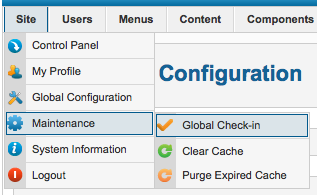
Also under the site menu, you'll find the Maintenance option. From here, you can globally check in all content, clear the cache or purge the expired cache from your Joomla site.
Joomla Review – Maintenance:
The Users menu to the right of Site in the screenshot above contains Joomla's extensive user management features.
Joomla Review – User Management:
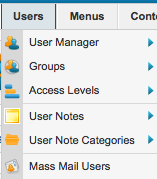
There are a number of sub-menus, as you can see, with everything from user and group management to user notes, access levels and even the ability to mass mail users from within Joomla (which I think is an awesome and super handy addition that I'd love to see implemented in more systems).
Joomla Review – User Manager:
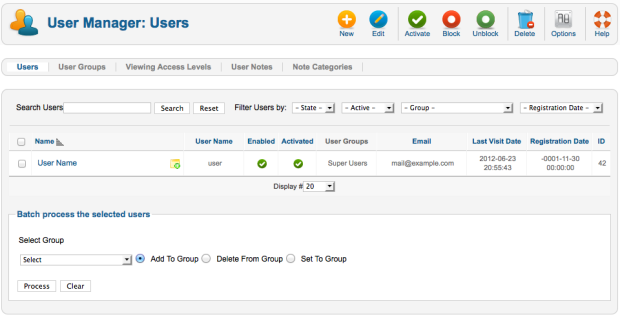
The Joomla User Manager features a number of readily available options such as the ability to filter the list of users by state, group, registration date and whether or not they are active or inactive. Aside from the typical users, groups and access levels there is a feature called User Notes. This is similar to something that one would normally find in forum software and they are described as “pieces of information which can be assigned to registered users on your site. These notes can contain for example comments about ‘offending' or ‘difficult' users etc.” I'm not sure how often something like this would be used, but there was obviously a reason or they wouldn't have implemented it (one would assume anyhow).
As I mentioned earlier, there is the option as well to mass mail a group of users from within the Joomla back-end. This can be handy for sending notes to groups of publishers, your marketing team or perhaps some content editors about upcoming editorial changes, for example.
Joomla Review – Mass Mail:
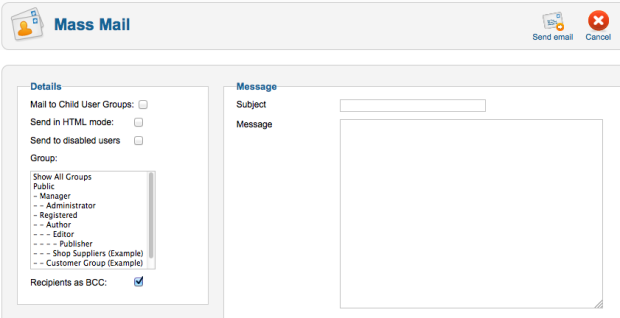
Before you can use this option, however, you'll need to ensure your SMTP settings are configured under Joomla's Site menu. When I attempted to use this option without having the mail settings configured, I received the poorly worded and confusing error message shown below:
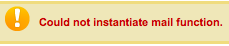
I'm not sure if they were shooting for the word ‘Initiate' or ‘Initialize' but the one they used (even though it IS an actual word) definitely doesn't fit the use. Not a big deal, these things happen but I'd like to see more specific error messages with, at the very least, steps to correct of some kind. With a system as large and popular as Joomla, it's a bit disappointing to see obscure, poorly worded error messages such as this.
Even clicking on the Help button doesn't tell you that before trying to use the mass mail function, you need to enter settings nor does it have a link to the settings themselves. I'd personally like to see the help adjusted accordingly and an opening message on the mass mail tab that can have a ‘dismiss' option that explains that SMTP configuration must be complete before proceeding. Either that or a check and if it's not setup, a warning suggesting to do so with a link. That's how I would handle it. Hopefully, the Joomla dev team will make the necessary changes.
Moving on to menu management, this is where you would go to configure your home page. In all versions of Joomla that I've tested, you've always had to go into the Menus option and then click on Main Menu to configure your pages.
Joomla Review – Main Menu Settings:
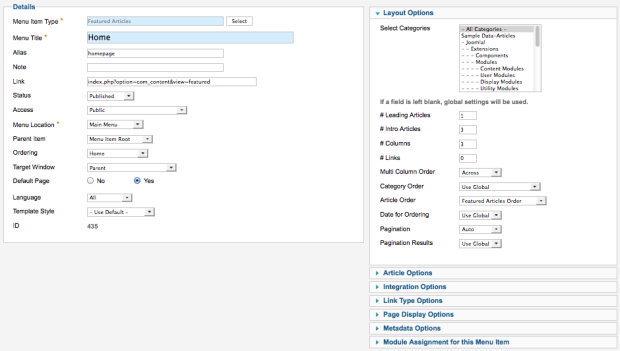
I've always found it incredibly unintuitive that you had to go here to set up your pages but that's how Joomla has always done it.
Time to check out the Articles section.When you first enter the Article Manager, you'll be given a list of all articles which you can filter in a number of ways.
Joomla Review – Article Manager:
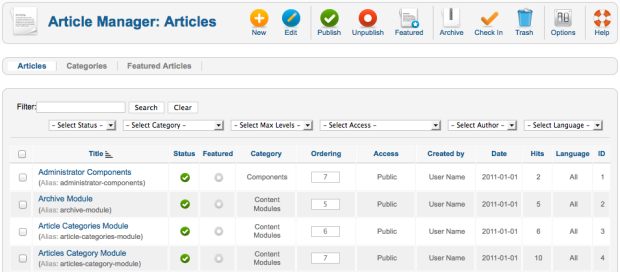
You can set your featured articles, configure the ordering, access levels and much more. Joomla has a ton of options here and you can spend a lot of time just exploring the choices on this page. There is also an Options button that will guide you through a host of configuration options (far too many to list in this review, you simply need to take a look for yourself and explore).
Adding a new article is simple to do and for most, using the built-in WYSIWYG editor will come naturally.
Joomla Review – Adding a New Article:
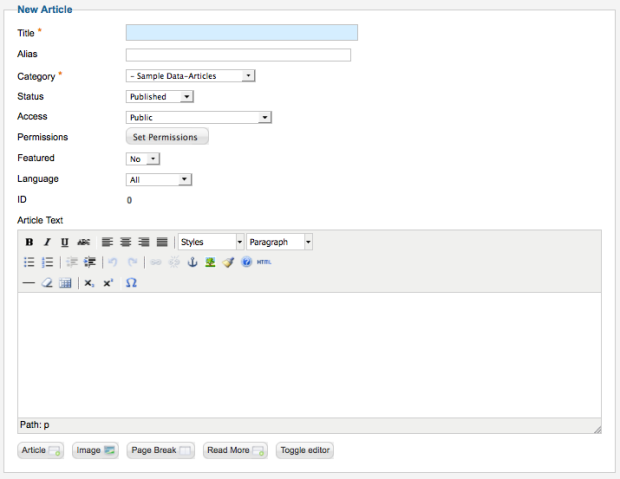
TinyMCE (the editor used by default) is pretty much the standard on the web and it makes sense that it's used here as well. I've always wondered, however, why the Joomla team didn't simply integrate their buttons with the editor as opposed to putting them underneath the post box (shown below). I'm specifically referring to the Image, Page Break and Read More buttons. I'd personally prefer to see them embedded directly within the editor itself given the amount of free space on the toolbars.
I'd also suggest cleaning up the editor, which clearly does not require three rows of buttons given all the blank space on the three rows shown above. Again, I mention these things in the interest of improving the experience for users new to the system. It's not just the big changes but also the small aesthetic ones that can be the biggest improvements in making the overall customer experience a cleaner and more intuitive one.
Below the editor window, you can set permissions for the article you are writing. This is part of Joomla's excellent granular security and I'm quite a fan of how they've implemented it.
Joomla Review – Article Permissions:
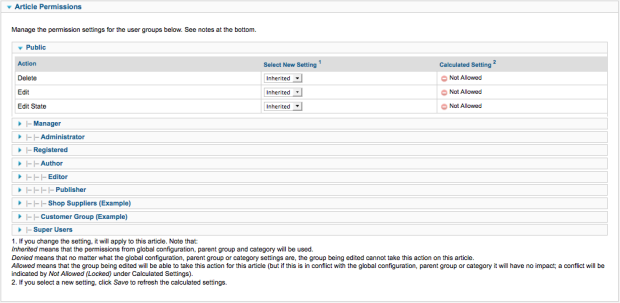
There's quite a bit of functionality available on the editor page and you'll also find an extensive number of options that can be set on a per article basis.
Joomla Review – Article Options:
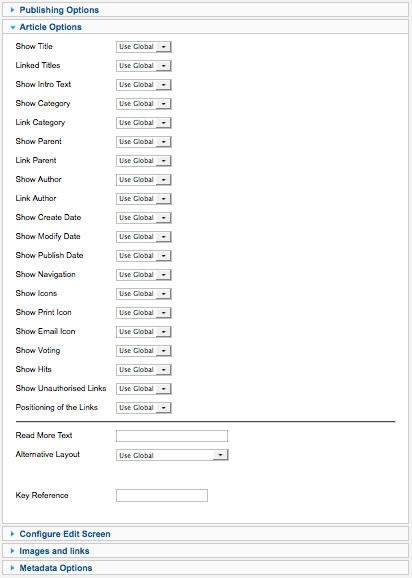
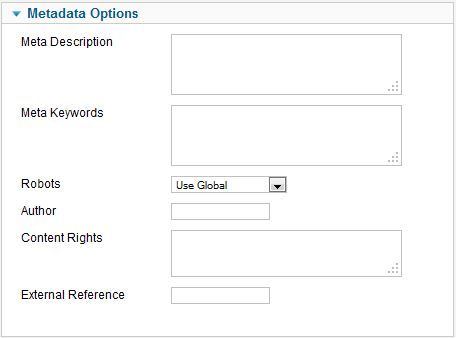
Under Publishing Options, you can set the author, publishing date, publishing end date and created date. As you can see, under Article Options, there is a myriad of choices and you're given quite a bit of control over the appearance. There is also an Images and Links section and a Metadata Options choice which lets you set the meta description, keywords & more.
Time to examine the Media Manager, a crucial element for a CMS.
Joomla Review – Media Manager:
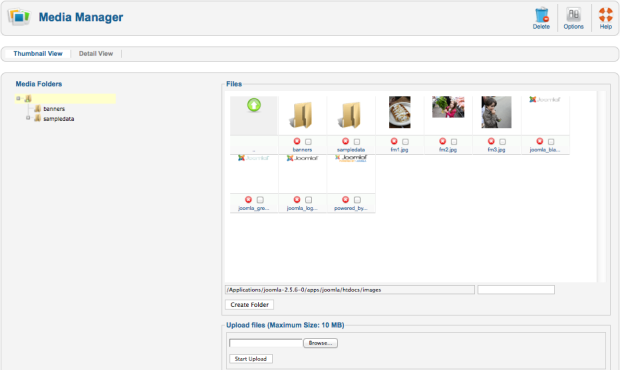
In my test, I uploaded three images with the expectation that I'd be able to at least re-size or crop them. I quickly found out that I could do neither. In fact, other than deleting it, I couldn't do much of anything. You cannot drag and drop them into folders, you can't even move them into a folder with a menu, because there simply aren't any menus. So what does this media manager do you ask? Nothing other than allow you to delete or upload. That's it. Nothing more.
Even the most basic CMS I've used in my many years testing content management systems has more to offer in the media management area than Joomla. Joomla is one of the most well-known open source CMS in the world and this is what they offer end users? Can it be extended by plugins? Sure, it likely can, but for it to be like this by default is nothing short of appalling and mind-boggling. I'm quite shocked to find the system this limited. So much so in fact that I had to go back and make sure I tested every possible option to make sure I wasn't missing something. Unfortunately, this is how it really is out of the box.
I think I've made my point, time to move on.
Under the Components menu we go…
Joomla Review – Component Menu:
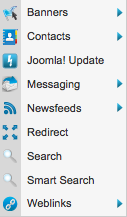
Under this menu we have a ton of cool options. Take the Banners section for instance. Within here, you can manage all of your advertising and it even tracks the clicks on each banner.
Joomla Review – Banners:
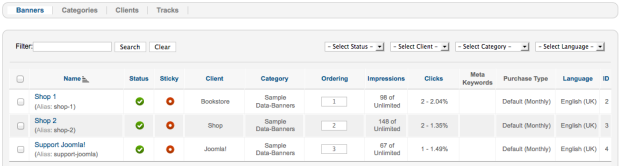
I love the click tracking and the interface for adding new banners is well thought out and implemented.
Joomla Review – Banner Settings:
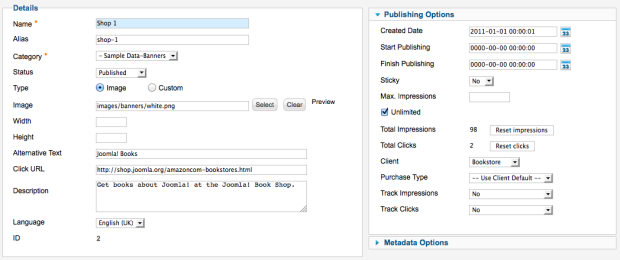
It's got lots of options and is a great alternative to advanced ad platforms for those who are just looking to get some basic ads served up on their site without the need for advanced reporting and analytics. I've got to give kudos to the dev team for this one.
Next in the Components menu comes Contacts. Within this area, you can manage an address book within the CMS. The system is built using basic form functions and allows you to categorize them. It's a handy addition where one could put support contacts, marketing groups and other useful information so people within the CMS can get quick access to emergency numbers, etc.
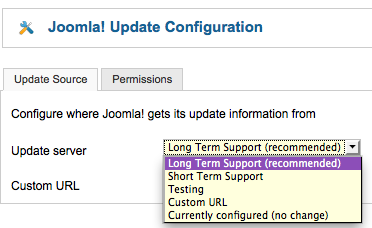
After Contacts comes the Joomla Update section which, you guessed it, polls the Joomla servers for an update. You can also customize the update server if your I.T. team happens to package their own distribution of the CMS or likes to vet out updates first before releasing them. You've also got the ability to determine which version repository you are polling for updates.
Joomla Review – Update Configuration:
After the updates section is Messaging which is basically Joomla's implementation of private messaging with email notifications. Nothing too fancy here, it's just there and it works, 'nuff said.
News Feeds is next in line. This section is likely to be the least used given the recent updates to the way Google handles indexing of content and realistically, if you are simply republishing news feeds, your site is not likely to perform anywhere near as well as it once may have. There may be people using this to pull feeds from other sites within a network of sites, in which case it would be valuable and I'm sure it has its uses, I just don't think it requires an in-depth examination in this review so we'll skip over it for now.
If you need to set up redirects, the Redirect component will allow you to quickly point a link to another and if you like, enable and disable them at will. This can be handy for a number of scenarios and is handy to have.
Search is next. This is an interesting component in that it lets you see how search is being used on your site by visitors. To test it out, I turned on search statistics with the options menu in the screenshot below and promptly did a search for the term ‘joomla' on the front end of the site. As you can see, it was captured right away and shows up.
Joomla Review – Search Manager:
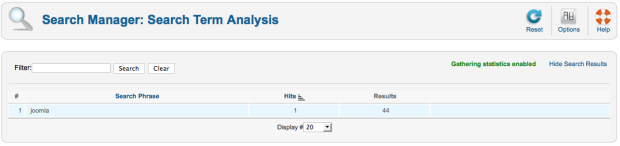
I can definitely see this being valuable and think it was a great addition to the CMS. It's actually the first time I've seen this type of tracking captured natively in a CMS before. WordPress has something somewhere similar but it requires a plugin. I'm a statistics guy as well so knowing stuff like this is invaluable and I'd use it regularly.
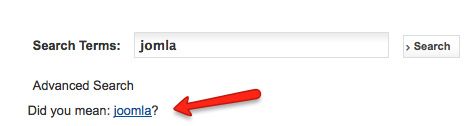
Next comes the Smart Search component. This was introduced in 2.5 and is disabled by default. The system indexes your content. Search results are scored dynamically based on the context and frequency of search terms. From there, the most relevant content will always be listed at the top of the results. It then suggests alternative phrases and allows you to install new search adapters which provide support for standard Joomla! content and many other types of documents. In addition to this, custom search filters allow you to provide contextual searching when your visitor is looking at particular sections of your site.
Smart Search is a great addition and definitely adds to the overall user experience. Here is an example of how Smart Search would assist with misspelled words when a user performs a search:
Joomla Review – Smart Search:
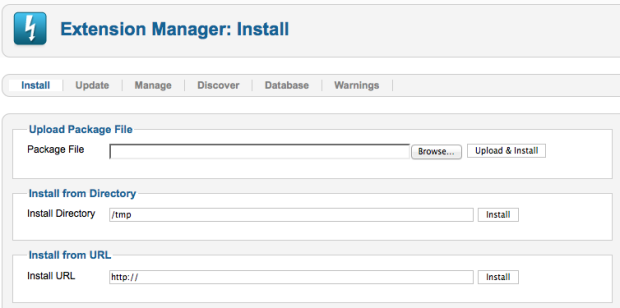
Finally, we move to the Extensions menu. From within this menu, we can manage all of the extensions that have been added to the CMS. You can install new ones, check for and update existing ones, manage the extensions, etc. The extensions manager is pretty straight forward and there's not much to discuss here. What is relatively new is the addition of the Updates tab which allows you to see updates for existing extensions.
Joomla Review – Extension Manager:
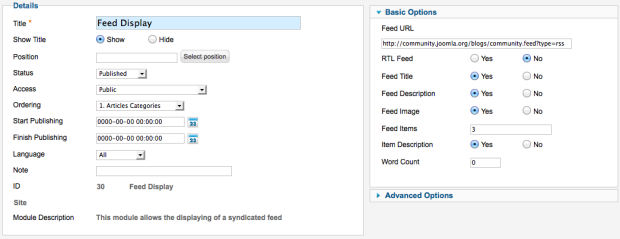
In the Modules section, you can modify the settings for each of the modules in the site. For instance, if you clicked on the Feed Display module, you'd be presented with the configuration options specific to that module.
Joomla Review – Feed Options:
You can also manage menu assignment for every module within the system but I'm not going to show a screenshot for that. This review is already getting long enough as it is!
The same basic concepts and functionality apply for the Plugin, Template and Language managers respectively. You can install and configure each from within these menus. There wasn't anything that jumped out as an issue during this review so I'll skip the screenshots and in-depth analysis there. If you want to learn more about these modules, you can read up on them on the Joomla website.
Overall Functionality
Mobile Responsiveness
Smart phones and tablets are becoming the primary tool for consuming web content and I was a bit disappointed to find that the default templates that Joomla provides are not enabled for mobile devices. I examined each of them with my Galaxy Note smart phone and attempted to request mobile version and had no success. I would have liked to see some templates included that had mobile functionality. When browsing the templates that were installed by default, I could not find any obvious comments or descriptions identifying any of the templates as “enabled for mobile” nor was I able to find an option to do so.
Having said that, the template system that this open source CMS provides is incredibly versatile and functional. If it wasn't, there wouldn't be so many Joomla template shops around. For this reason, it's not hard to find exceptional mobile templates and frameworks that can be used as starting points for a pretty amazing looking site.
A couple of great starting point for Joomla Templates:
- JoomlArt – These guys have been around since 2006 and have a great selection of Joomla Templates. They also have a great framework called T3 Framework that's a good starting point for those looking to have something to build off of.
- Shape5 – Shape5 has the Vertex Framework and regularly releases great looking (and responsive!) templates to the community. As of this article, there are just shy of 70 templates to choose from. A good starting point.
- Themeforest – I spend way too much money here. Themeforest has templates for tons of systems including Joomla & WordPress. There's a good selection here with plenty more being added daily.
- RocketTheme – Last but not least, these guys have been producing high quality themes for a number of years and have a great framework called Gantry that is easy to modify and great looking.
There are countless other companies providing quality templates and frameworks as well. It's not likely you'll have a problem finding one that fits your needs.
I would love to see an app for Android or iPhone that let's a person manage basic tasks within their Joomla site. At the moment, in the Android marketplace at least, there are a few unofficial apps but I'd love to see something similar to what WordPress put out. Is it a make or break scenario? No, not at all.
SEO (Search Engine Optimization)
Joomla does a pretty decent job by default of providing options that allow you to optimize your site for the search engines. Within the global configuration, for instance, there is a configuration box where you can set a number of parameters:
Joomla Review – SEO Settings:
It also includes a metadata box on article pages where you can modify the meta description, meta keywords (if you use them), set the author, control indexing with robots settings and more.
Joomla Review – Metadata:
Also new in 2.5 when compared to previous versions:
- You can now use unicode in URLs, which means you may now use special characters like ‘ö' and ‘ä' or Arabic or Hebrew characters in the URL.
- A title of a site will be displayed following the name of the website in the browser.
If you feel the need to expand the open source CMS' functionality even more, there is a huge selection of plugins that can help you do just that.
Versioning
This is an area that I'm rather surprised hasn't been addressed in any of these new releases. Simply put, there is simply no versioning for articles in Joomla without the installation of a third party extension. That means, if you make a change to an article and save it, you will not be able to revert your changes to the old article.
Personally, I feel this is a huge miss and I'm disappointed that it hasn't been added. Again, I hate to reference WordPress all of the time but even it has the capability of using old versions. Albeit, in WordPress it's a bit overkill on the versions it creates but at least the capability is there. If you are looking for article history and you want it to be a core component, you won't find it here.
The extensions that provide the capability exist and you'll have to search the Joomla extensions directory to find a suitable option. The issue I have with relying on extensions it that you are adding another middle man and a lot of companies like to avoid this as much as possible.
Multiple Databases
Currently, Joomla can interact with both MySQL and Microsoft SQL Server databases. According the the 2.5 release announcement, work is underway to expand to more platforms but from what I can see, this is all that is provided at this time. If someone is aware of use cases where Joomla has been used on databases other than those above, I'd love to hear about it in the comments.
Conclusion
The Bad
Media management is very poor and limited with no ability to move, resize, crop, scale, organize or really do anything with images other than upload and delete through the media manager. This is a huge disappointment and for a CMS with this level of activity and popularity, I'm alarmed as to how this was overlooked.
Spelling issues and a confusing error message on the Mass Mail component can lead to confusion. The help section for this component also requires updating with clear direction as to prerequisites to its use. This is a great opportunity for the help system to be updated with minor changes that can allow this to quickly become a non-issue.
A lack of versioning really hurts the system and it's rather unfortunate that something as highly sought after has been excluded. Sure, there are plugins that can do the job in place of the core system but one shouldn't have to rely on plugins for functionality such as this.
The Good
Joomla is chock full of options. Some of my favorites include the search keyword tracking and banner management with click logging. These are great additions not often seen in open source content management systems.
SEO Options have improved dramatically over previous releases and it's no longer necessary to rely on third party plugins to bring a new Joomla site up to par. Combined with their excellent templating system, achieving a decent ranking in the search engines shouldn't be an issue for most customers. A caveat, a CMS can only perform well if the effort put forth into achieving quality SEO exists. Websites require quality coding and attention to detail, the CMS can only do so much.
I've mentioned it above and I'll mention it again. It is very easy to design a good quality template with Joomla. This is where the product really shines in my eyes.
Thats my Joomla Review. What do you think?
[note color=”#cfcfcf”]If you need additional assistance deciding if Joomla is the right CMS for your project, I offer cms consulting services and will be happy to assist you with your decision making process.[/note]