We last reviewed Concrete5 in 2009 when it came onto the scene with a bang. Designers everywhere reacted to this new CMS with mixed feelings. Most of the people who tried it, were blown away and loved it. Today, we’ve gone back and put together a more current Concrete5 Review for you.

There were a lot of WordPress and Joomla fans who were unimpressed with the way the system was being marketed at the time. Concrete5′s fearless leader, Franz Maruna, was quick to point out that his system was better than the big two (Drupal and Joomla) and wasn’t mincing words about it. This, of course, set off a lot of people on a “how dare you?” tirade that only served to market Concrete5 further and peak people’s interest.

Whatever side you were/are on, there is no denying that 2 years later, this system is thriving and still seeing large numbers of people converting to it.

How does Concrete5 stack up? Let’s take a look.

First off, Concrete5 has a couple of options for those interested in using it. You can get it hosted on their own servers for pricing ranging from $45 / month and up. Alternatively, you can just download it and put it on your own server. It’s always good to have options.

Working with the System

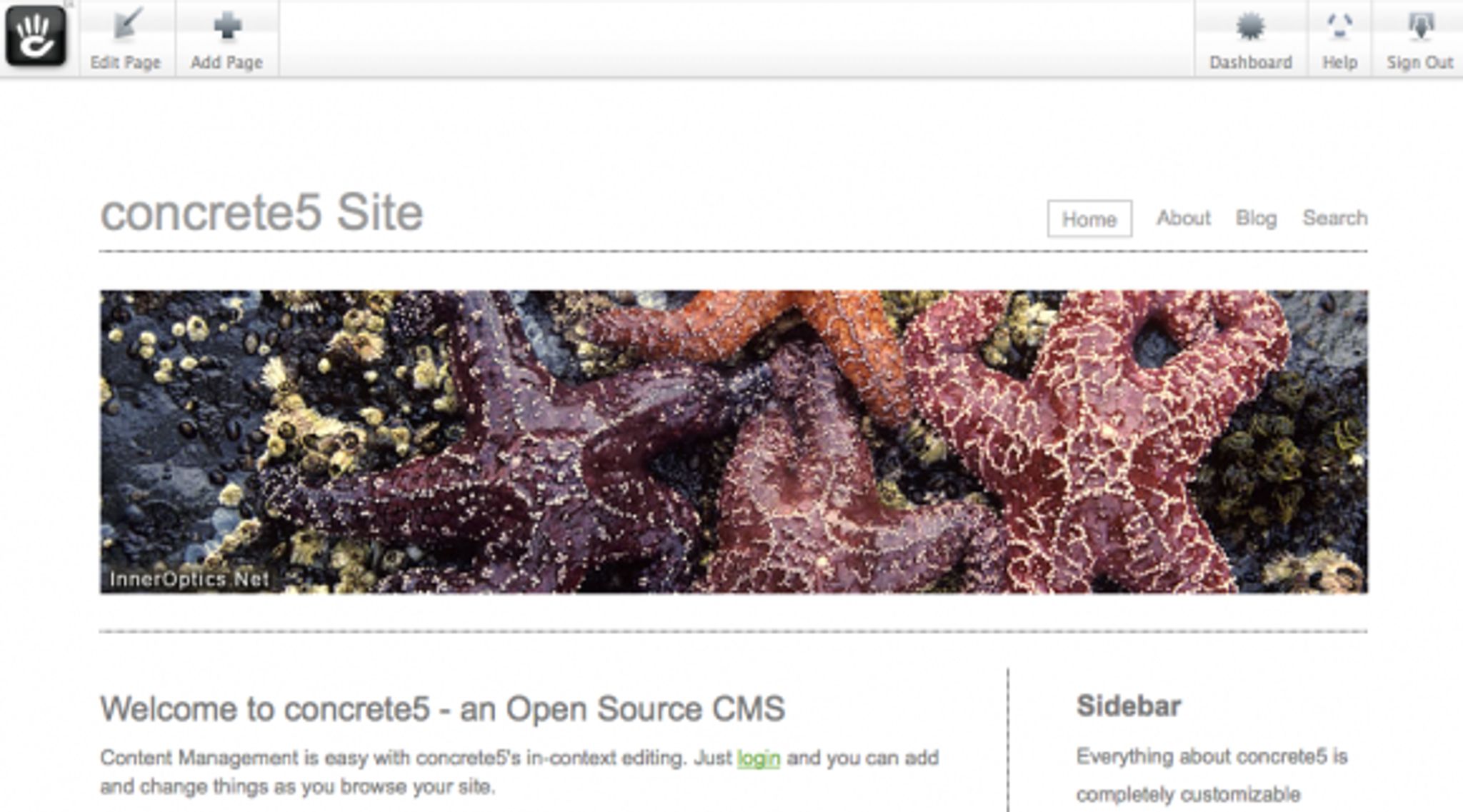
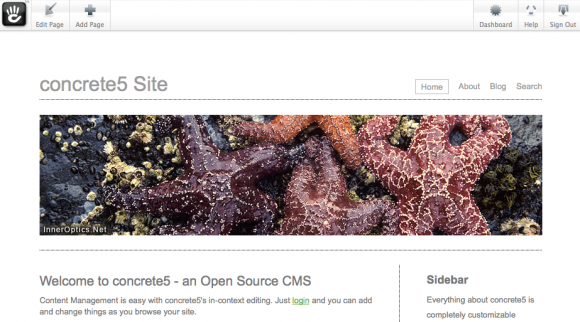
When you first use Concrete5, you will be presented with your standard page once you’ve logged into their admin interface. Being that Concrete5 was primarily designed to allow you to work with the page as you see it, all of the tools are available in a toolbar along the top of your site.
Concrete5 Review

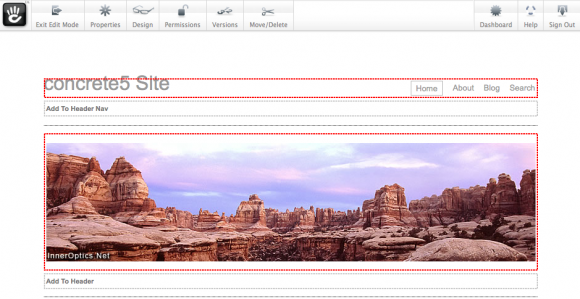
Clicking on the Edit Page button on the toolbar enables edit mode which lets you begin working with the content and layout.

Edit mode is shown below:
Concrete5 Review

As you can see, the toolbar along the top has changed to provide you with options available for edit mode. Hovering over an editable area (defined by the red outline around the content) and clicking will bring up a context menu which options to work within that area.

Concrete5 Review

Clicking Edit brings up the applicable properties page (or editor if you have selected a text area) with which you can modify the area in question. In this case, we’re going to take a look at the navigation bar.
Concrete5 Review

For this area, we’re given options to work with and modify the navigation of the site. Any time you click on the edit when working with C5, you’ll be given the applicable dialog box depending on the type of area you select.

For instance, should you choose to edit a content area that contains a slider of images, you’ll see a dialog such as the one below:

Concrete5 ReviewAnd of course, choosing a content area will give you a pop up WYSIWYG (what you see is what you get) editor window:
Concrete5 Review

Accessing the Page Properties button on the toolbar, opens the settings for the page you are on.
Concrete5 Review

Concrete5 has implemented meta tag functionality on a per page basis, so if you want to edit the Meta Keywords, Description or Title you can do so on the Custom Attributes tab of the above window. You can also add your own attributes should you choose to do so.

On the Speed Settings tab, you can modify your caching options to either full or off and how much time the page is cached for. What’s nice is that you can set this on each and every page at will.

On the Design button on the top toolbar, you are given the ability to modify the page type and/or choose a theme to apply to the page.
Concrete5 Review

The Permissions button is pretty obvious and allows you to modify who can and cannot see the page. C5 also has built in versioning, meaning you are able to work on a page but revert to an old revision if you need to do so. This is an extremely useful function and has been well implemented. You can access your revisions from the Versions button on the toolbar.
Advertisement

Concrete5 Review

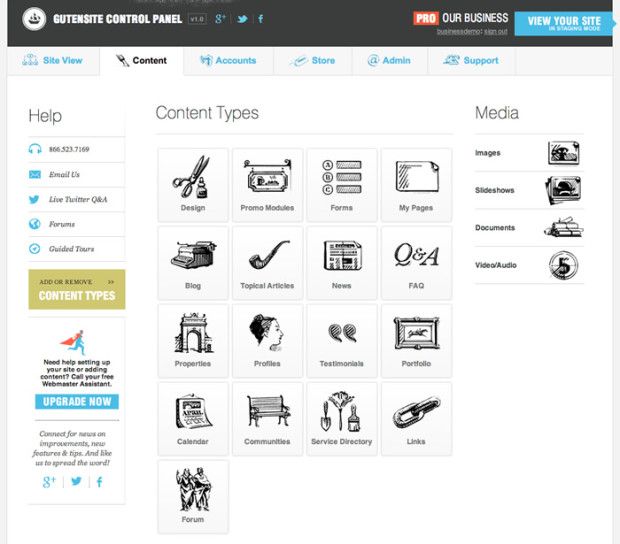
Concrete5 also has a dashboard where you can make modifications to global settings and see site statistics. It can be accessed using the Dashboard button on the toolbar and looks like this:
Concrete5 Review

Look familiar? For some of you who’ve used WordPress, you’ll note that the C5 dashboard is very reminiscent of the popular blogging platform. Is this a bad thing? Not at all, if you see something that works, then follow suit and there’s no harm in that.

On the dashboard, you can instantly see site statistics and a number of other areas that you can navigate. Starting from the top, the Sitemap button is pretty straight forward and gives you a birds eye view of your site in a sitemap. Next in line is the File Manager where you can upload and work with the various files on your site.  The Reports button should show you any data from forms or logs you may have on your site. When attempting to use it on our demo system, it told us we had created no forms. It wasn’t immediately obvious how to do so, but thanks to C5′s great documentation, we quickly found out the process. If you want to know, here’s the how to: (Creating forms in C5).

Users and Groups lets you modify access rights and privileges to the site and worked as expected.
Concrete5 Review

Next down the list are Scrapbooks which is a rather interesting feature. Here’s a video explaining how they work: Concrete5 – Scrapbooks.

In a nutshell:

Everyone on the site gets their own “clipboard” if you will, we call it the scrapbook. When you roll over any block in edit mode, you can Copy to Scrapbook on it and save it to your personal scrapbook.

Later, if you’re on another page and want the same block, instead of adding a new block you can choose Paste from Scrapbook and see a list of all the blocks you’ve saved for later.

When you add a block from your personal scrapbook you are making a new instance of that block. That means this is totally not useful if you want to have the same block show up in many placed but be editable from a single location.

Pages and Themes are pretty obvious. Here you can access and apply various page templates and themes to your site.

The Add Functionality option lets you connect your site to the Concrete5 marketplace. The marketplace is a community addons repository where you can search and purchase / download addons and theme for the system.

Under System and Maintenance you are able to perform backups, see scheduled jobs and more.

Concrete5 Review

Last but not least, Sitewide Settings does just what it says and lets you configure your site to your hearts content.

Conclusions

In testing the demo on Concrete5, we found the system to be sleek, responsive and easy to use. What’s interesting is how it’s akin to what you would find in expensive commercial products but you can get it for free. The inline editing is a pleasure to work with and the system seems powerful and responsive. Can it be compared with Joomla and Drupal? I think it’s a different type of CMS. One that is in a different realm from these two and as such, comparing them would be fruitless. Concrete5 was designed to be easy, you can see it in the way the system works and the logical way everything just does what is expected.

It’s a fun system to use and with the growing number of addons and themes, it’s getting better all the time.

One thing that should always be considered is how well the pages generated by the system are coded and whether or not they validate properly. One small concern we found is that when submitting the demo system we were using with no modifcations by us to the W3C validator, it came back with an error.
Concrete5 Review

Now, before you jump to conclusions, this is a pretty minor validation error. Hopefully, the team at C5 see this and quickly correct it. Having said that, it would have been more reassuring to see none at all but this wouldn’t be a major fix.

Overall, we think C5 is definitely a top contender for those looking for easy customization and a great community. If you want to try it out, you can do so on their demo site.

You can download the system from here: Concrete5

Tagged with →  
Share →
  • http://www.thecatholictravelguide.com Gloria Grove

    I currently have a website on Intuit which is really easy to use—just insert text boxes, photos, etc. I was planning to switch to WordPress because it gets great reviews for SEO, forums, etc but so far have not found it to be easy to work with. Is C5 considered to be SEO friendly as well as easy for a novice such as myself?

    • http://www.cmscritic.com Mike Johnston

      C5 is a good platform but if you are comparing to Intuit, you might be better off with a website builder. It really depends on the type of site you are building, drop me an email to cmscritic@outlook.com and we can discuss the best options for you.

  • Sebastian

    I have just used C5 after my frist steps in a test installation. There are certainly cool features I love too: In page editing, clean and simple templates, a lot of features are built in.

    But there are disadvantages as well.
    Where the easy in page editing is pretty handy, the other back-end stuff is cluttered in different pages. It doesn’t feels I – or non-tec clients – can intuitively work with it. Some so called content blocks use tables for the layout – it’s quite hard to change a form for example to look different. If you have more than a basic/standard template it is not as easy as it looks like to choose the right template. My first impression was quite well, my last impression was not :(

    Overall it looks nice and editing is really cool. Documentation is remarkable good and features are in most cases more you need. However, some drawbacks are in C5 as in every CMS :-)

  • http://www.meltdesign.co.uk/ matteld80

    I’ve used the rest and in my opinion concrete 5 is the best CMS!! A great simple intuitive user interface for clients to manage the site with once you’ve handed it to them, I get half the support request now using c5, The theme/ template system is the simpliest I’ve found  so you can build great looking sites without much pain, its fully extendable and powerful if you can write php and its all free!! It doesn’t have wealth of plugins and widgets some of the others do but I’m sure this will grow as it becomes more popular! 

  • http://seojeek.com alxvallejo

    I don’t get the ‘Scapbook’ feature. Copying and pasting duplicate content from your site not only hurts SEO, but it’s pointless if you ever want to update a block of content. 

  • http://www.whatisacnc.com crob09

    I highly recommend Concrete5. I have two websites built using the CMS and if you know PHP the sky is the limit.
    The websites I built using Concrete5 are http://www.whatisacnc.com and http://www.cncstuff.com both are the original template, but you can customize very easily.

  • http://www.vSCWebGroup.com Jay van Santen

    I’ve developed websites in WordPress, Joomla! I’ve adopted C5 as my standard company CMS.

    If you’re developing a blog and want everything canned — your theme and add-ons — then WordPress is the most efficient approach to develop the site. It’s straightforward to learn and implement and users can easily update their blog entries.

    Joomla! offers significantly more sophistication. It is designed and well suited to create newspaper type websites. The many add-ons give a great deal of power to the environment. It is less straightforward for end users to modify in more complex ways.

    C5 offers a developer and user experience more along the lines of actual web development. When trying to build sites according to a client’s specifications rather than the development model (and quirks) of the underlying CMS, I found myself fighting WordPress and Joomla! though both in different ways. C5 is different. As you make design decisions, you find that there are multiple levels at which those can be implemented. As you dig beneath the surface, you find a logically constructed framework which makes it easy to extend functionality.

    The development model isn’t as pure as php frameworks using a fully consistent MVC framework. Yet, it often choose more simple models which solve the more typical web development issues — and this makes development a more gradual approach.

    The end user interface (and actually you end up using that for most development) is a joy to use. Clients take to it immediately as it’s almost like using tools they’re already familiar with.

    There is a significant learning curve to moving from beginning to intermediate use of the platform. I spent an equivalent amount of time on Joomla! But, at the end of that time, I had a little knowledge of the Joomla! architecture and a lot of knowledge of Joomla! workarounds — and a fair amount of frustration. With C5, I that time and learning “opened the book” on C5 — and only excited me more about going further.

    What do you need to bring to C5?

    Certainly you can use it out of the box and it’s almost as easy to use as WordPress.

    If you want to move to an intermediate level:

    You’ll need thorough knowledge of CSS and HTML. The flexibility and tremendous ease of use of designing your own templates very easily means a good background here to take full advantage.

    Knowledge of PHP. The API is well exposed, but you’ll need to at least feel comfortable reading code and working with it.

    Enough knowledge of CMS systems that you know the kinds of problems they’re trying to solve. I actually wouldn’t recommend C5 as the first — it’s helpful to work through the hard knocks of other CMSes to understand why things are complex in the way they are.

    Lacks:
    Documentation is scattered. An excellent intro is Remo’s Beginner’s Guide — but this is really an intermediate guide which assumes knowledge of HTML and PHP. Check out the various documentation on-line directed to an orientation to the environment for a good start. Then, just pursuing items you’re interested in gets feet wet.

    The API info is scattered also, and users are typically referred to the source to understand.

    The community is active and helpful.

    There are gaps, and significant gaps in 3rd party functionality.

    If you want to meet client’s needs and do innovative web work, I haven’t found a more efficient and pleasant environment to work in than C5. To take advantage of it’s strengths, it is best suited to a person or teams that combine the dual expertise of design and development.

  • http://www.greggdeselms.com Gregg DesElms

    I’m sorry…

    …but here’s what I’m skeptical about: Two users (and both they and the readers know who they are) who chime-in here with such skepticism, focusing on the one thing which WordPress and Joomla have over not just Concrete5, but pretty much everyone else (except maybe for the likes of Drupal) and that’s an admittedly HUGE and VOCAL (er… well… “vocal” in a posted-as-text-on-the-Internet sense) developer (and user, too) community.

    To cast doubt on Concrete5 because of that, though, just seems to me, likely, to be WordPress and/or Joomla Kool-Aid drinkers trying to somehow poke at whatever they can regarding Concrete5, which seems to so vex them.

    Make no mistake about it: WordPress and/or Joomla are excellent (at what they do, which isn’t really exactly the same as Concrete5 or any other true CMS). And Concrete5 isn’t perfect; and if I had one complaint about it, it’s that some of its best add-ons aren’t free. But as the Concrete5 web site apologia on this subject correctly points out, somebody’s gotta’ make a little money on all this somehow, else it’s ultimately unsustainable (my paraphrase, of course). So I guess I can live with having to pay for a few of the add-ons when necessary.

    Most importantly, though, when addressing this whole WordPress/Joomla-versus-Contrete5 silliness, is the absolutely critical point that WordPress/Joomla apologists just never seem to get, and that’s that neither WordPress nor Joomla are actually “content management systems” (CMSs) in the purest sense; and so don’t really even belong in the same category as Concrete5. Rather, WordPress and Joomla are blogging systems/engines which — usually by extension or plug-in or add-on — can, admittedly be shoe-horned into behaving generally CMS-like, but they can still never quite get past the close-but-no-cigar point on that score.

    Now, that said, it’s true that WordPress, now, contains certain back-end functions for, for example, field creation and naming, just to name one, which admittedly blurs the line between blogging software and true CMS a little… I’ll give WordPress that one; and I’ll bet even the Concrete5 guys would, too. But even with those features, WordPress remains a BLOG, not a CMS. And no amount of wishing otherwise will change that.

    So, then, when it comes right down to it, the whole silly business of comparing Concrete5 with WordPress or Joomla (or vice versa) is an apples-to-oranges thing. It really is.

    WordPress and/or Joomla are really only CMSs if “CMS” is used only as a broad category of systems, regardless of type, which generally manage content. But that’s not how the term is generally used. Those who didn’t cut their teeth on the general (and broad) category of “CMS” via the likes of WordPress and/or Joomla; and who have used true CMS systems (of which Concrete5 is one… albeit a particular kind of “edit-in-place” CMS), know the difference. And there IS a difference… a difference which is non-trivial.

    As long as I’m on a tear, here, let me add: I wishtohell people would stop using blogging software as true CMS systems. Boy, if I had to pick a thing in life which absolutely drives me to utter distraction, it’s that. I, for one, am just sick-to-death of entire web sites which have no business being blog-like behaving… well… blog-like.

    A blog format/paradigm is simply not appropriate for most entire web sites… er… well… that is, of course, unless the entire web site really is a blog. I mean… you know… a REAL and ACTUAL blog… and we all know what that is.

    Most web sites should look and behave like web sites have always looked and behaved, and so should be controlled by a true CMS. Thereafter, if there’s a part of the overall site which really is a blog, then, of course, yes, a true blogging engine should be used for just that part of the site…

    …and when that’s the case, then, yes, of course, I cannot think of a better tool to use than WordPress (or even Joomla, I suppose, but WordPress… c’mon… let’s face it… is better). [Braces for hate mail from Joomla lovers]

    Here’s my very simple rule-of-thumb: If the web site’s overarching (or underlying, if you prefer) purpose is to promote a product, or an organization, or a book, or a piece of software… or whatever similar thing, as long as it’s a thing or a person, as opposed to, for example, ideas and opinions or news ABOUT things or persons….

    …then such things as the “Contact” and/or “About” pages should bygod not be, in effect, blog entries (even if they’re made sticky or static or given their own menu items).

    If there’s one thing that makes me crazy, it’s showing-up on a product site, and seeing a list of blog postings in newest-to-oldest date order, each containing the the first few lines of their respective entire postings, with “Read more…” (whatever similar) links at their bottoms; and each posting being news about the product…

    …and nowheere to be found is so much as a paragraph, right on the front page, where it can’t be missed, explaining what the product is and/or does, its features, how to download or obtain it, etc. Instead, the whole thing just a darned blog… not really a true product site. But that’s just an example. I can say the same thing about virtually any site about any person or thing, which site would be better if not a true blog.

    I bring this up because that is one — perhaps the biggest, most glaring, and most offensive — of the fundamental mistakes which primarily those who wrongly think that WordPress and/or Joomla are true CMSs tend to make. And the result is web sites which are downright maddening; and developers and maintainers thereof who get defensive and arrogant when challenged about it (as I’ll bet no shortage of such persons will chime-in, here, and, in protest to this posting, do).

    Unless a given web site’s primary purpose is to be a blog — and I mean, goshdarnit, a TRUE, classic, traditional blog — then the likes of WordPress or Joomla should simply not be used to develop and drive it.

    That said, if a part of the site really is a blog, then fine: That part (and only that part) both can and should be controlled by the likes of WordPress or Joomla. But, seriously, folks: If the rest of the site is (or at least should be) more traditional in appearance and function, then a true CMS — such as Concrete5 (though there are gazillions of other good ones out there, these days, which this site well documents and reviews) — is what should be used.

    If, in addition, the true CMS has a blogging component (or, better yet, some way of natively and seamlessly integrating WordPress or Joomla into it), then all the better. But the bottom line is that a true CMS is one thing, and a blog is another, and, again, no amount of wishing otherwise will change that.

    And I wish that WordPress and/or Joomla Kool-Aid drinkers would get that straight, once and for all!

    ____________________________
    Gregg L. DesElms
    Napa, California USA
    gregg at greggdeselms dot com

  • brian

    Concrete5 is quite fun to play around with, and it is very effective as an easy way to make custom websites. It has a user base of around 65,000 (from their latest stats) sites that update from concrete5.org regularly, and it is growing all the time.

    I like it because it is so easy to make a theme for. It’s theme system doesn’t really stitch anything together like other CMS’s out there. You can make a theme for it with one default.php file and one view.php file, both of which are simple html pages with some php in them to denote areas for adding blocks to. You can of course make it much more complex than that, but their is no need to if you just want a simple editable site.

    Also I don’t see the problem with having a element inside an element. Block elements are put inside of anchor tags all the time. I don’t put much stock in validators at all. There is so much stuff that needs to be done to make a good website actually work in most browsers it doesn’t make sense to try and hide it all just to fool a silly validator.

  • http://www.danielking.com.ar Daniel King

    As Jonathan, I’m also skeptical. However, I will keep an eye on Concrete5.
    I’m currently develop for WordPress, and I can say that WP was not a big CMS choice until version 2.8, but it’s developer community is a strong one. I would like to have such a community around Concrete5 to make a switch.

  • Susannah Pryal

    They are on the Concrete5 website.

  • Jonathan Smith

    I'm sorry but I cannot help but be skeptical. Though I have seen many works created in Concrete5, where is the developer community? Where are the developers that use this CMS on a daily basis and have a growing portfolio?

    I see it referred to as "small but growing". To consider it or recommend it to others I would need to see good examples of corporate or business websites created and managed in Concrete5. I just don't trust any review these days. Overall this was a very comprehensive review Mike. Thanks.

  • http://www.shadowcomputers.co.uk Steve Roberts

    Concrete5 is so easy to use; training clients on how to use it has never been so simple. The inline editing makes it possible for even the worst techno-phoebe can to easily and confidently update their web sites.

    Built-in versioning even makes it quick and easy to undo changes someone has made, and thank to a good user and group setup you can even ensure only certain users and/or groups have access to particular pages or even blocks.

    For designers and developers, creating themes has been the simplest implementation I have ever done for any CMS.

    There is a marketplace of full of add-ons and themes. Many cost a little, but they are affordable and there are a lot of free ones too.

    One thing to remember is that Concrete5 itself is also FREE.

    The community is not as strong as it is for other CMSs, but it is growing and most importantly it is a friendly community, which is what many CMS communities are not these days.

    Most documentation is around in the community forums and in the how-tos.

    This means that you have to do some searching for the answers you need, but you can usually find what you are looking for in a few minutes.

    If not, just post a discussion in the community forum and you usually get a quick response to your questions.

    Overall, Concrete5 gives you everything you need from a content management system.

    My advice is to forget about all the other Content Management System :)

  • andy

    It's look a nice CMS for me. I'd like to know much about this CMS. Is it any tutorial or any forum who lead about Concrete5?

  • http://twitter.com/concrete5 concrete5

    Thanks for the great review!

    You're right, there's a few bits of html the system spits out today that aren't strictly w3c compliant, but nothing major. Since moving our repository away from subversion and to Git we've actually seen these issues addressed by the development community, so its safe to assume the next version of concrete5 will be even more clean in this respect.

    You should also check out advanced permissions. It's a flag you have to turn on in a config file, but once you do there's granular control on a page by page or even block level on who can do what. Using that a lot of companies are using concrete5 to build extranets and intranets that serve as a critical part of their organization.

    Generally that's the approach we've tried to take with concrete5 across the board. Make it simple at a glance, but make sure there's plenty of power and control for those who want it under the hood.

    I appreciate you taking the time to take another look at concrete5 – I'm sure your readers will find it to be a useful tool.
    -frz
    ceo, concrete5