SEO Toaster is a product by a company called SEO Samba and is touted as “Most advanced SEO CMS & Ecommerce website builder right out of the box, free and open source”.

Does it actually stand true to this statement? Let’s investigate.

You can download the product from the SEO Toaster website (link at the bottom of this review).

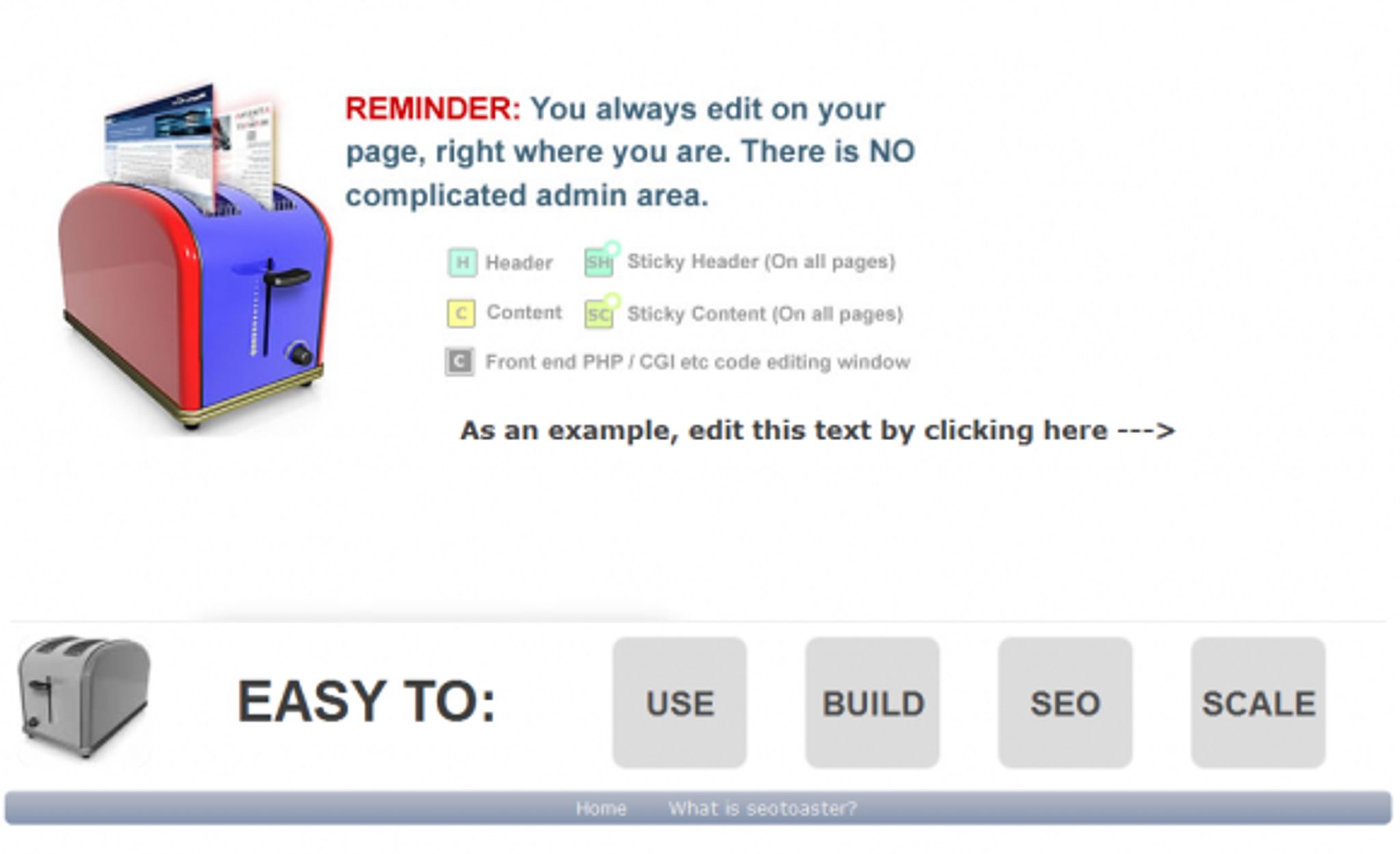
Once you’ve installed the product (a fairly painless process) you are greeted with a rather plain page:

As you can see in the screenshot above, it states that there is no admin area and you can edit text immediately by “clicking here” except there’s nothing there.  Typically, if you had first authenticated yourself, you’d actually see something where the arrow is pointing. If you have not, however, you would be totally lost.

There is no easy hidden link to authenticate and if you installed the system and wanted to come back to it in a few days, you may not remember that the path to the authentication screen is http://yourdomain.com/go which could leave you stumbling around frustrated for a few before you can find the way in.

Is this a game breaker? Of course not, but it is something that I think needs to be corrected or improved on.

Let’s assume now that you have authenticated yourself, you would see a small box with a letter in it and the screenshot above explains their meaning.

Once you are logged in, you will have a “show/hide dashboard” function as shown below:
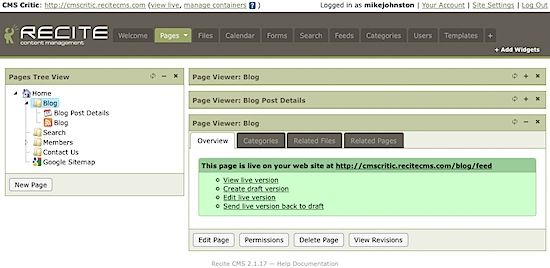
True, it might not be the most attractive looking dashboard, but it works and is fast to navigate the options which is what matters.

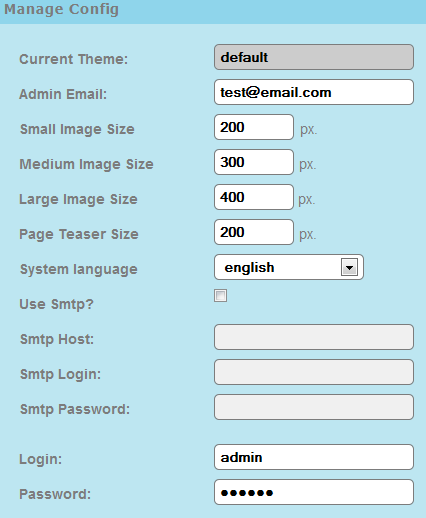
Browsing through the functionality we have a number of menu options. The screenshot below shows the configuration management screen where you can make minor config changes:
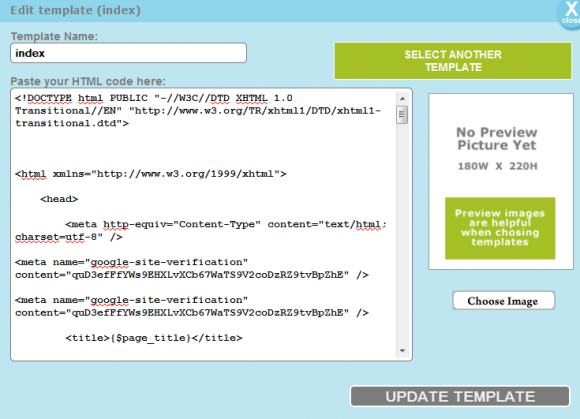
Template editing is also supported:
There is also a quick screen for editing your pages properties as well with all of the necessary SEO functions available to edit:
Advertisement

One of the nice new features they’ve added is shopping configuration which also has it’s own quick config screen and looks rather easy to use:
Ok. Now that we’ve shown you some of the pages, let’s talk about what we liked and disliked about this product and perhaps this will help you decide if it’s the right fit for your needs.

First let me say that this is a really fast website builder. It is very quick (mostly due to the lack of graphics) and works as it should for the most part. It has a good chunk of functionality and includes the most common SEO functions one would expect.

The addition of the payment integration is nice but currently only supports PayPal which is a bit limiting. However, at least it has some form of ecommerce functionality.

I would not, however, call this the most advanced SEO and eCommerce website builder available and that’s the part that I am struggling with. I most certainly think it’s a good product and it appears to have tons of potential, but I see no advanced SEO functionality that is different from any other website builder or CMS I’ve tested. Also, considering the ecommerce options are limited, it’s not really right to call that piece advanced either.

Are these issues with the product? No.

Does this mean you should avoid it? Absolutely not.

In fact, I would recommend you test it out and provide feedback to the SEO Samba team so they can improve the product. I think functionally, it’s a very good system with a ton of potential that is just waiting to be fully realized.

Sure, they jumped the gun a bit with their motto but that’s part of marketing and you can’t fault them that.

Summary

Pro’s

  • Really fast
  • Very easy to install
  • Easy to use

Con’s

  • Needs some visual changes to give it a more professional look. (it’s hard on the eyes).
  • Needs a login button or link somewhere.

Wanna try it? Get your copy here: http://www.seotoaster.com

Share →
  • MichelLeconte

    Hi Andy,
     
    sorry we were very busy with SEOTOASTER V2 which is a complete rework of the core system, and did not timely respond to the forum posts, nothing personal there.
     
    Now, SEOTOASTER comes in two flavors, CMS and E commerce edition. You will be glad to know the E commerce edition does fix the zip code issue you’ve reported. SEOTOASTER CMS V2 has just been released, and the E commerce version will follow in the coming couple of weeks.
     
    As for secured transaction, V2 just like V1 has a checkbox in the shopping config. Once checked, visitors are sent to https when hitting the /cart page. Your add to cart” or “view cart” widgets are automatically configured to do so.
     
    I hope this helps.
    Best,
    Michel

  • Andy

    I’m starting to wish I hadn’t installed this.

    I really want to like it. Enjoyed building the site with it (although some parts are still a bit clunky) but generally pretty good.

    The problem is that when users go to buy something with the automatic shipping switched on it prompts them for an address but doesn’t accept anything but US zip codes. It is built to be used internationally, it knows I’m in the UK but only accepts US zip! Why not allow it to have any text in the zip box??

    The Payment page has a Paypal or Credit/debit card payment box. If a user chooses Credit/debit a box appears for them to insert payment details. This page is not https, there is no lock anywhere on the page to indicate security, just a large /picture/ of a lock with some poorly-worded textual reasssurance that ‘Thanks to our state of the art shopping cart, your credit card information is safe. Our system never gain [sic] access to your credit card information. blah blah’.

    I’ve tried to get some answers on their forum — they seem happy to answer most people’s questions but no reply to mine. I guess they may be embarassed. So I have decided to air my frustrations around the web.

    Most disappointing. We’ll see what the forthcoming version 2.0 Toaster fixes.

  • http://www.seosamba.com michel leconte

    Good news,

    the plug-in system is now available in version 1.8.3.

    You can download it here:
    http://www.seotoaster.com/download-seotoaster.htm

    We just created some plug-ins for Paybox as a new payment gateway.

    Enjoy.

  • http://www.seosamba.com Michel Leconte

    Weird, maybe you have installed it from another package you pulled earlier on? my colleague just pulled it from the download page and the same theme we have for our demo site was in there as default. .

    For everyone, you can log in at http://demo.seotoaster.com/go using demouser/demouser over there.

    • http://www.cmscritic.com Mike Johnston

      Hm, must have. Thanks for the updates Michel!

  • http://www.seosamba.com michel leconte

    Hello Mike,

    thanks for the review. Too bad, you have not had a chance to play with our last built which ships with an E commerce theme.

    Let me clarify a bit our positioning in relation to SEO.

    SEOTOASTER integrates a number pre-built SEO functionality to maximize website potential with search engines;

    Automated deep-linking (choose an anchor and a destination page, and the system does the linking throughout the site), automated point & click link siloing through Java-script (known as link sculpting), automated 301 creation, automated rel=canonical insertion to avoid similar content indexation, automated image tag labeling, automated link and media integrity (remove a page/image and you're being prompted to remove internal links to them), integrated query aid to Google Wheel for content writers…

    All of these functionality ship with the basic install and are fully embedded into the system. I have not seen any other CMS offering anything close to this features set out of the box??

    From an Ecommerce stand-point, we also create automatically micro-formatted products listing. About 4% of websites use micro-formats today, this gives an edge to the small merchants using our system in the semantic web arena. We also use micro-format for the review widget, and supply a Google Product formatted product.xml feed for shopping aggregators. Being understood with more certainty by search engines ensure higher rankings all other things being equal.

    We also paid attention to conversions with a single page checkout, and the B2B merchants with an integrated quote engine for the complex sales. Users can request a quote from checkout instead of capturing a credit card and merchants receive a quote request, which they can edit and in one click both publish to a confidential URL and communicate within an email to their prospective client. Once again here, nothing needs to be installed, just one box to check.

    More about E commerce here with a 2 minutes musical video; http://www.seotoaster.com/ecommerce-solution.html
    By the way I think the product interface is pretty slick…closer to an Ipad than OS commerce, I let viewers be the judge of this after watching the video.

    We are now working on our plug-in system which does lack. In our next release, developers will add shipping, processing gateways and any other application easily without having to touch the system's core. We also preparing a few plug-ins to help folks get started with it.

    In November, it will be the first year anniversary of SEOTOASTER (CMS critic anniversary is October I heard, so congrats to you for putting together this valuable resource), we hope to have everything in place to support a growing user community by then.

    Who knows, we might also change the side panel colors.. :-).

    Thanks again for your time.

    • http://www.cmscritic.com Mike Johnston

      Thanks for the clarifications Michel. I downloaded the version from your website today so if it came with an eCommerce theme, I didn't see the option anywhere. Where / how does it get installed?