On July 21, the long awaited release of MODx Revolution was let loose on the public. For those who are unaware, Revolution is a ground up rebuild of the CMS based on the paradigms and principles of MODx but eliminating most of Evolution’s limitations. Here is our MODx Review.

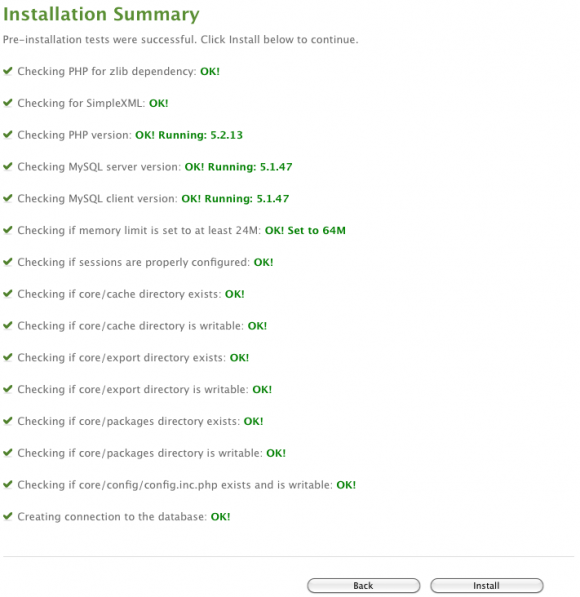
We were eager to test out this new system so we grabbed a copy and began the installation:
MODx Review

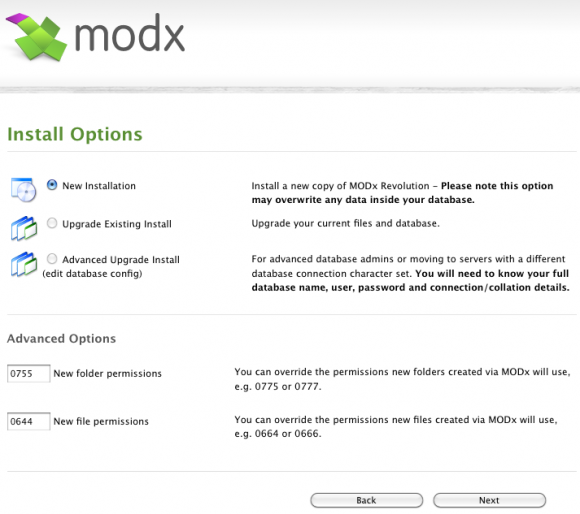
The process of installing MODx is quite quick and easy, with most of the work performed by the system and minimal interaction required by the user.
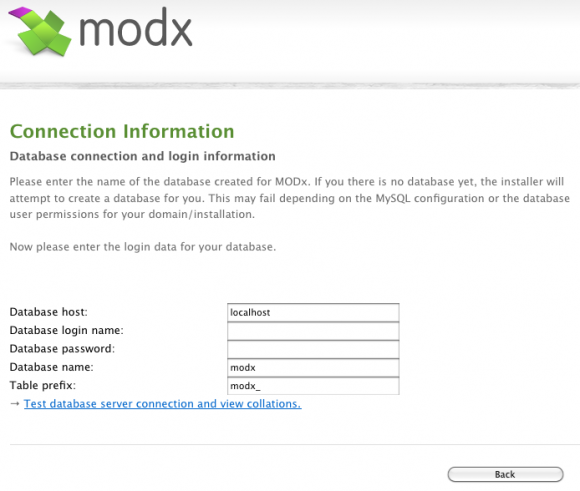
MODx Review

MODx Review

MODx Review

Once installation has been completed, you get to log in to the manager (the back-end of the CMS):
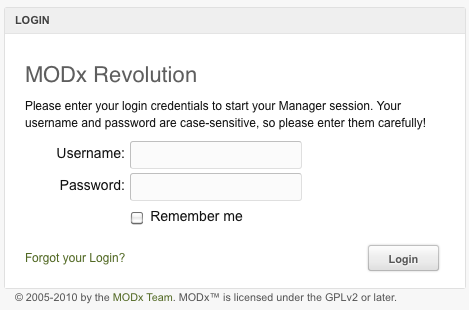
MODx Review

After logging in, you’ll be greeted with a slick welcome screen that provides you with some suggestions on next steps to take.
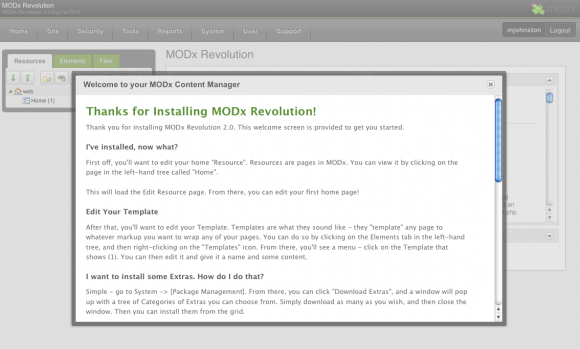
MODx Review

MODx Review

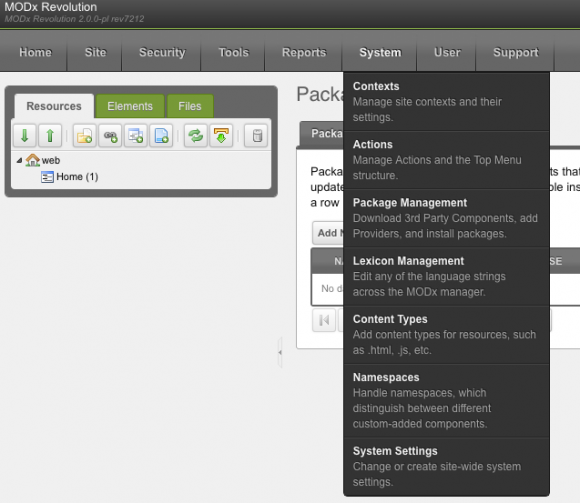
As you can see from the above screenshot, the manager now sports a slick and responsive new GUI with nice descriptive drop down menus and and excellent use of screen real estate. Just from our first few times messing around with the system and exploring, we found it to be extremely responsive and snappy. We have been told that there may be issues with Firebug and Firefox causing the manager back end to slow down but from our tests, we didn’t experience any of these issues.

Right click menus are abound in this release and can be used almost everywhere within the manager back end:
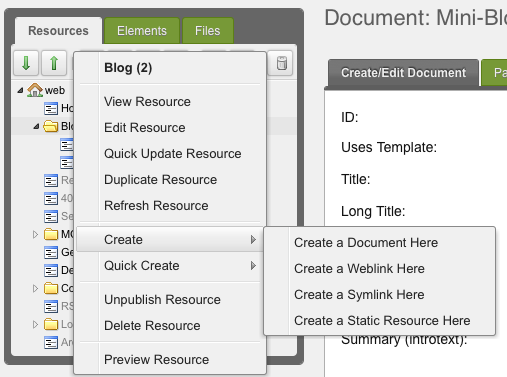
MODx Review

Before we start exploring some of the new features of the system, here’s a quick breakdown of the key ones (pulled from the MODx release announcement):

  • MODx Revolution 2.0 can be used on much larger and expansive sites as it boasts  better site performance from an all new caching system with fine grained options to cache any Element (or not if you need it that way). In addition you can override the default caching and use large-scale caching methods like Memcached.
  • Extend or override any part of the MODx core including System Settings, Users, Language, Sessions and much more. This enables you to safely extend core features and integrate with other applications and maintain a clean upgrade path.
  • Developers can create redistributable add-ons, or an entire MODx Distributions using Transport Packages.
  • Assign different views of your site based on almost any criteria using Contexts.  Contexts provides a simple way to have native multi-sites, subdomains or even securely running the MODx core outside of webroot.
  • Developers now have access to better error tracking and debugging capabilities through Core Logging. It provides various error levels and output targets including ECHO, HTML, and FILE. You can also use it in add-ons for audit logs, error logs, debugging, or other logging needs.
  • Unified, simpler MODx Tags now support multi-line tag calls for better readability in development, calling of cached tags within other cached tags, and allows native and custom modifiers to be attached to any Element (Snippet, Chunk, TV, Etc.) similar to PHx did in Evolution but far more efficiently.
  • The Manager is MODx. The new Manager for MODx is built using the MODx API, ExtJS from Sencha, and Smarty templates, as a demonstration of the new core and API.
  • Web users and Manager users are now Users that can be grouped and assigned fine grained access and permissions. The User system can be extended to provide external authentication and handle additional user record information via the API. Completely new user system – all permissions are now handled via a robust, Attribute Based Access Control (ABAC) security model.
  • Property Sets allow you to change all your the properties for Snippet calls in various locations across your entire site from a single location in the manager. Create a Property Set, assign it, and then manage all the calls in one  location.
  • Properties are available to all Element types including Chunks, TVs, Templates and Plugins.
  • Manage and customize your MODx Lexicons — the language records for things like labels, event notices and more for local, industrial or regional terminology, all from within the Lexicon Manager.
  • Install Add-ons and custom Transport Packages from MODx using the Package Manager. Open the Package Manager and search for available addons or your own private addon repository.
  • Manage files on the filesystem (even outside of webroot) within the Manager using Static Resources.
  • Create exact clones of other resources in your site tree in as many places as you’d like with Symlink Resources.

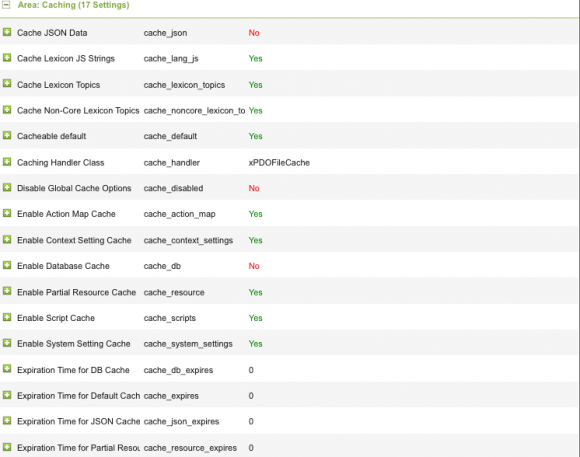
Pretty expansive list isn’t it?  Let’s take a look through the system at some of these new features.. starting with the caching system. Caching capabilities are controlled by a number of settings found under System -> System Settings in the manager.

The Area: Caching settings can be found on the first page near the bottom and look like this:
MODx Review

Clicking on the plus signs beside any of the settings will present a description of that settings functionality. As you can see, there are plenty of options that you can play with to improve performance of your CMS.

Clearing the cache is as simple as selecting Site-> Clear Cache from the manager menu.

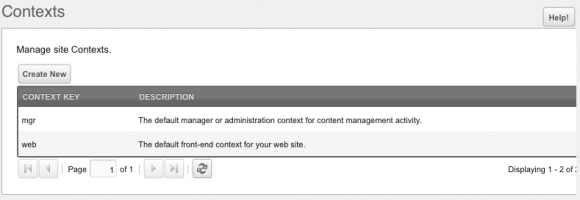
The next area we’re going to show you is the Contexts. Contexts allow MODx configuration settings to be overridden, extended, isolated, or shared across domains, sub-domains, sub-sites, multi-sites, cultural-specific sections, specific web applications, etc.

To access the contexts, navigate to System-> Contexts in the manager.
Advertisement

MODx Review

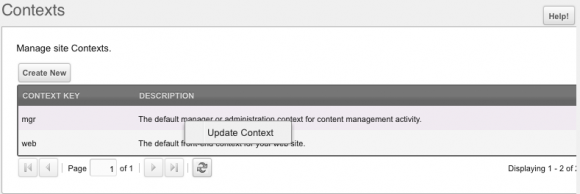
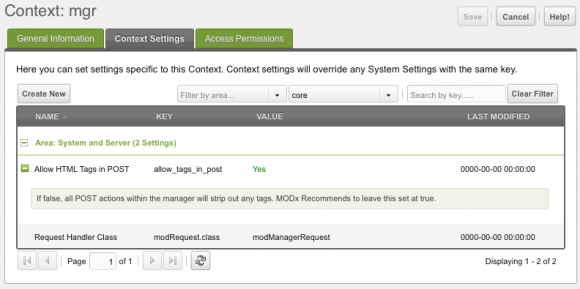
To modify a context, simply right click on the one you wish to modify and select Update Context.
MODx Review

This will present you with the context editing screen where you can modify the settings:
MODx Review

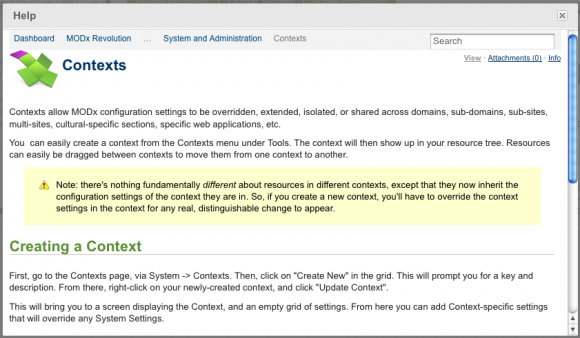
What I particularly found handy was the Help button in the top right that provides information and assistance for the various areas should you need it:
MODx Review

For a system with such power and expandability, it’s good to see the developers didn’t lose sight of the help functions and provides some great built in assistance. This is a great addition.

The last addition we are going to show you is the new package management that was built into the CMS.

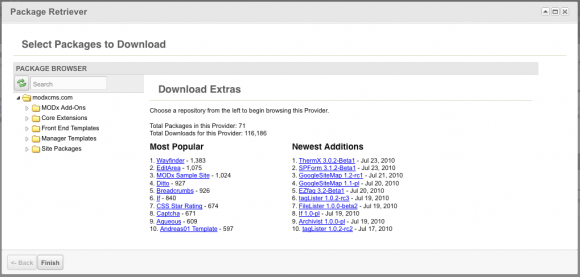
You can access the package management component from the System->Package Management dropdown:
MODx Review

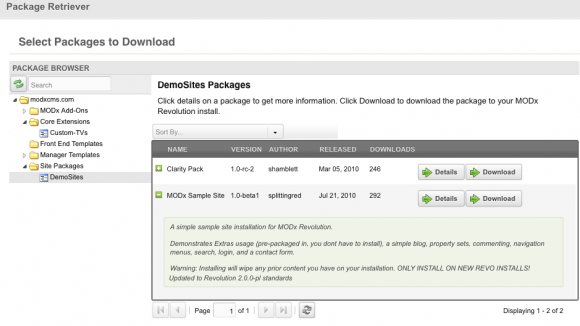
Navigating the package browser is very easy and consists of simple dropdowns. Say for instance you wish to install a sample site, you can do so with a couple of clicks and be ready to go. Simply use the dropdowns to find the appropriate package, click the Details button for more info and click Download to add the package to your installation:
MODx Review

Once the package is downloaded, you are given the option to install.. which is as simple as clicking the button:
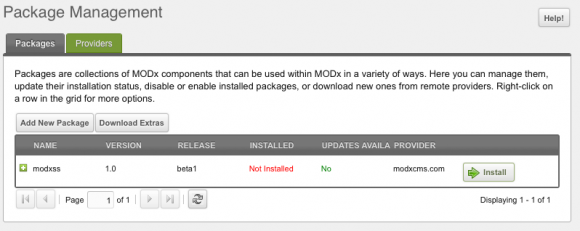
MODx Review

And that’s all there is to it.

There are obviously many more additions we can fit into this review as this new release comes chock full of goodies as you can see from the bullet list above.. but from what we’ve managed to ascertain so far, this is one incredible release.

The MODx team should pat themselves on the back for creating what we think is one of the most functional and slick looking content management systems on the market today.

From their responsive back end to the myriad of right click context menus and help functions, they’ve outdone themselves with this release.

Everything feels fast, fun to use and powerful as you navigate through the system. It really is astonishing that a product of this caliber is free and for that, we have to say a big thanks to the MODx team for bolstering the open source community with yet another quality product. Great work guys!

We know we are just touching the brink of what comes with this new release, what are your most/least favorite new features and additions? Join in the discussion in our comments below!

Interested in getting your hands on this excellent release? You can do so at http://modxcms.com

Tagged with →  
Share →
  • Antony

    The package management system on Revolution is really handy, but as a non-expert, I still prefer Evolution. I’m sure it has technical limitations, but I like the Front-end editor, and I understood the permissions system! After several trawls through the Revolution Docs, I am still completely baffled. I’m sure it’s great if you’re running a huge website with diverse groups of users, but for a straightforward, small business site I wish there was an equivalent to the simple Admin/Editor/Publisher settings.

  • http://designfromwithin.com/ DESIGNfromWITHIN

    MODX truly is a breath of fresh air for any developer/designer.
    - Logical resource tree
    - Unmatched flexibility
    - Nice and easy to use
    - Great CEO features
    - The best user community in the world!
    - Clients love it
    - You can make it as big/complicated/technical as you need, but default is nice and clean.

    P.S. check out my package for a nice quick-start of MODX Projects:
    Flexibility – https://github.com/DESIGNfromWITHIN/Flexibility

  • Gabriel Tenita

    I was a MODx fanboy, but there are problems that send me in search for another CMS: I don’t like when I have to modify settings in both the database and the files to make things work and the whole chunk/snippet thing makes you put the code all over the place – the administration interface looks like a showroom for programmers and (in Revolution) its speed is decent only if you compare it with previous versions of itself.
    As I like more the speed of MODx Evolution (1.x.x branch), I tried to switch back for on site, but stupid bugs like http://bugs.modx.com/issues/4156, left alone for months and new versions, make me think the two branches (2.x.x – Revolution and 1.x.x – Evolution) are not treated equally.
    Because of these, all the time saved by the awsome templating system is lost (and then some) by using the administration interface. MODx is your best choice only if your site has only front end.
    As I said, I used to preach MODx, but right now I feel I need to search more.

  • http://www.paradesain.net/en/ meds

    I have try modx both evolution and revolution. I can a website fastly. But, i don't like the dashboard, I more like wordpress dashoard with simple and clean design and list of content than modx that have a post list like a windows folder list..

  • Anonymous

    With 2.1 is releasing soon, i will definitely give it a try. It is the best PHP-based CMS while Composite C1 is the best ASP.net-based CMS.

  • modx lover

    I've used MODX for two projects and i love all the features except the front-end editor. I'd definitely keep using it as my primary CMS, but everything falls apart when a client has to use frontpage to edit content. So many problems with caching, CSS styles and showing content as it appears on the page… I understand that all extras are developed by a community and i truly respect all the great work the developers have done so far…just waiting for next release of Frontpage or possibly a new front-end editor that would compete with other CMS' editors.

    • http://www.markhamstra.nl Mark Hamstra

      I did a teamviewer screen share session just yesterday with a client to explain the back-end. It really aint that complicated if you (as developer) set it up properly, name your fields logically and just simplify the UI by hiding what's not being used.

      The whole front-end editing requirement is overrated in my opinion.

      Heck, I explained the content management in just over an hour to a woman in her late 50's who was surprised she didn't have to install anything on her computer.

      • http://www.weebox.net Krisj

        "The whole front-end editing requirement is overrated in my opinion." –

        I would strongly disagree with this.

        Front end, specifically inline editing is the future (perhaps moving onto dictation etc.). It is not the developer who will dictate what becomes popular, the end user will. Always. Things that are easier to use win. Even if they are technically inferior. Users are also willing to pay considerably more for ergonomically considered designs.

        You should never underestimate this. There are 1000 (probably a lot more) users per 1 developer unfortunately. Or fortunately.

        MODx is great, but still a lot to do to make it end user friendly.

        • http://www.cmscritic.com Mike Johnston

          I don't know that front end editing is necessarily the future. I would agree that it's definitely becoming more and more of a "like" but I don't know that I'd classify it as a "need".

          I can't see serious publications writing their articles through the front of the website, having an administrative interface is part of what people look for in a CMS and gives users a sense of CMS security.

  • Ademola Osindero

    This version of MODx seems to have been rebuilt to follow Typolight (now Contao) design. I need to put it to test and see which is easier to use.

    The more the merrier and good work ModX Team

  • http://www.ditsmedia.nl Gerson Laanstra

    Recently made a strategic choice to switch from closed-source cms to open source cms modx. Actually it is not a CMS, but framework enables the building of costum development. Already built a newsletter, login and reservation module for revolution. It works great.

  • Bert Oost

    I didn't know about MODx, but once I found it I was as happy like a child in a huge toystore. Now, with a couple of bugfix releases MODx is for me the greatest CMS around!

    For all developers wich not have tested yet; do it! It will be an great experiance…

  • http://www.taghouse.com.br Daniel Miguel

    For me is the all-in-one CMS/Framework solution, it made my company work so much better that it happend to be really the just one solution for any client.

  • Roger

    Great features , i just install it and wow i love this interface , enterprise features open , thanks

  • Ron

    I'm looking forward to a Symfony 2 based CMS.

    • http://www.cmscritic.com Mike Johnston

      Have you heard of any existing ones as of yet?

  • vhollo

    MODx always offered more than one different ways to do the job.

    Revolution now offers the best practices in PHP programming, giving access to everything via objects and classes, all expandable.

  • http://www.soopermuse.com soopermuse

    As somebody who has used a lot of CMS during my time as a web developer. I always found that one of the key issues with any CMS was that they usually either had far too much unneeded features/bulk. Either didn't have specific features or lacked a natural customisation ability that was usually only made available either through plug ins or messing with the often messy core code.

    What I have always liked about ModX, and now even more so in Revolution is the fact that it is not built as a CMS package, but that it's framework environment enables the building of internal modules and various other scripting practises from within the application with minimal fuss and mess. Its environment is suited to developers like myself who don't simply want to skin up an application, but build and expand the core features of it around a specific project as needed.

    ModX is one of the few web applications that gets 5 stars in my book.

  • http://www.modx-specialist.nl Modx Amsterdam

    As true Modx believers since 2005 we are very happy with the launch of Modx 2. Can't wait to start implement this version for new project!

  • Anton Andreasson

    Will the right click madness mean that I won't be able to use the Manager fully from an iPad? :(

    • Paul

      That is a serious point. iPads and the like are the future. If right clicking is just a convenience, that it fine, but it it's the ONLY way certain options can be chosen then it's really shooting itself in the foot.

      • justiceintime

        Buy a real computer for managing your website and business online not a touchscreen toy.

        • http://www.cmscritic.com Mike Johnston

          I don't agree. I would say that regardless of which device you choose to use, the appropriate functionality should be in place.

          • John

            Don't hate the CMS, hate the device. If a touchscreen toy does not provide a proper right click, then that is the problem, not the CMS.

          • Al Black

            A solution is in developement.
            http://modxmobile.com/

    • http://www.customitsolutions.nl Johan van den Broek

      This is untested as I do not own an iPad myself. From what I've read it should be possible to right click by tapping and holding.

      To find this info simply google "ipad right click" and read result #1

  • http://crowdreactor.com MODx Designer

    I've been closely watching the growth of various web content management systems over the past seven years, and while I like Drupal (a lot) and Joomla (too much superfluous code) and WordPress (always looks like a blog) I have always had a weakness for good application frameworks like MODx. It has all the horsepower, scalability, and code hooks a hacker could hope for. It offers a great deal for the designer as well.

    Cheers,

    Karl A. Krogmann

  • http://www.crossroadbg.com/misli/ Vassil

    Awesome distribution.

  • Adhi

    a very good review, makes Drupal 7 to be left behind

  • mIDO

    MODx has everything a developer needs. Scalable, simplicity, usable, powerfull, highly customizable…. It is what every CMS should be!

  • http://www.ichspiele.cc Alexander Trust

    It's a pitty that you can't install it out of the box. There are a lot of prerequisites to fulfil. We have a root server and tried to install it on. Evolution is running well on the system but as for Revolution it won't run on the Debian Lenny yet. We updated some php and mysql but then again we were told that we have a particular version of one of these which Revolution does not support due to some reasons everybody would understand especially programers. Well our admin is a freelance coder and he of course does not understand why it should be so complicated. We're running Debian Lenny and we're using the packages which are told to be stable. With the latest stable release though we can't run Revolution?! This is a bit ridiculous, don't you think so?

    But as I wrote this critique down here. I like modx and the idea behind it. I can run Revolution on my MAMP system locally but we won't get a system up an running online then until we coincidentally meet the requested things.

    • http://www.cmscritic.com Mike Johnston

      As far as prerequisites are concerned, I find it rather surprising that you're having such issues. I installed it on my Hostgator shared host as a test and everything works like a charm. Perhaps the forums on modxcms.com would be a good first place to let them know of your issues?

    • http://www.modxcms.com/ Shaun McCormick

      Alex,

      I think the main problem is that the Lenny package installs a faulty MySQL driver (5.0.51a) which is widely known to be problematic with PDO in PHP. To be fair, it's not really MODx's fault that the drivers packaged with Debian Lenny aren't updated to a stable version.

      That said, if your client is 5.0.51a, and your MySQL server has been upgraded to a stable server version, you should run fine.

      • http://www.ichspiele.cc Alexander Trust

        Okay. We’re using Squeeze right now and no longer Lenny. But to be honest, the installer is telling, it can’t find the server.